A local security scanner for Node.js projects
The problem
Securing a Node project means juggling tools nobody enjoys running
Scattered
Dependency advisories, leaked secrets and risky code each need a different tool with a different output.
Noisy
Long lists of findings, many of them false positives, and no record of why one was ignored.
Risky to fix
npm audit fix --force can break the build, and nobody knows until later.
02
What Gnawky does
One command.
Every scanner.
One report.
Then you decide, finding by finding:
Fix
Ignore, with a reason
Skip
03
What it checks
Five sources, one list of findings
| Source | Finds | Needed? |
|---|---|---|
| npm audit / yarn audit | Known-vulnerable dependencies | Yes |
| Next.js bundled React | React advisories in the copy Next.js bundles, which npm audit can’t see | Built in |
| gitleaks | Secrets in files and git history | Recommended |
| semgrep | Risky code: injection, XSS, unsafe eval | Recommended |
| Claude full audit | Logic flaws pattern scanners miss: access control, data leaks, auth flows | Optional |
A missing scanner shows as “skipped”, never silently ignored. Each one gets a live progress line and a timing in the summary.
04
How it works
From scan to safe fix in five steps
1
Detect
Reads package.json and file names to learn your stack.
2
Scan
Runs audit, gitleaks and semgrep with rules matched to the stack.
3
Triage
Optionally, Claude labels each finding real or false positive.
4
Decide
Fix, ignore with a reason, or skip, one upgrade at a time. Nothing runs until you confirm.
5
Verify
Fixes land on a new branch, checked by your tests and build.
05
Getting started
Install once, run it inside any project
# 1. install (version 0.4.1)
npm install -g gnawky
# 2. optional scanners (macOS)
brew install gitleaks semgrep
# 3. run it in your project
cd ~/code/my-app
gnawky
You need
- Node 18 or newer
- package-lock.json or a Yarn 1 yarn.lock
- git, for safe fixes
- Claude Code, only for the AI features
06
First run
A short setup tailors Gnawky to your project
1
Your project
Detects your stack, like Express, React or Docker, and warns if .env isn’t git-ignored.
2
Network access
Online (recommended) or offline: nothing leaves your computer, but only gitleaks runs.
3
Recommended tools
Installs missing scanners, and offers the package and pre-commit checks.
4
First scan
Saves semgrep rules for your stack, like p/expressjs, then offers to scan.
07
Daily use
Six choices, two of them submenus
gnawky my-app
1 high, 2 medium · 1 to fix for production first
❯ 1. Scan again
2. Findings (3)
3. AI tools
4. View report
5. Settings
6. Tools & scanners
Quit
arrows or numbers · q/Esc back
Findings (3 open)
1. Review & fix in Claude’s order (3)
2. Review & fix in the usual order
3. Browse findings
4. Ignored findings
AI tools (Claude Code)
1. Triage findings
2. Run a full security audit
3. Ask Claude for help
After an action you return to the same submenu.
08
Review & fix
One decision per upgrade, not per advisory
CRITICAL next: 40 advisories Also covers postcss (4) Fix Upgrade next to 14.2.35 auto, 17 23 need next after 15.5.27 manual Claude next: fix now postcss: likely false positive ❯ 1. Fix automatically (17 of 40) 2. Skip for now 3. Ignore all 40 (needs a reason)
Grouped by the upgrade
Advisories one change fixes are one item. A sample app with old next, axios and lodash: 75 findings, 3 decisions.
Honest counts
Each advisory’s range is checked against the version npm suggests. The ones it leaves open say which version they need.
The same grouping in Browse, both reports and Claude Code.
09
What to fix first · new in 0.3
What ships to production comes first
gnawky my-app 4 critical, 9 high · 6 to fix for production first CRITICAL next: 40 advisories ships to production (via next) fix first HIGH axios: 3 advisories ships to production (via axios) fix first HIGH braces: 1 advisory [dev only] dev only (via jest) HIGH vitest: 2 advisories [dev only] a test tool listed under dependencies, move it to devDependencies
Read from package.json
No AI needed. What your dependencies bring in ships to production; what only devDependencies bring in is dev only. Test and lint tools always count as dev.
First everywhere
Production critical and high lead the header, Review & fix, Browse and both reports, and Claude triage starts with them.
Next.js apps can bundle devDependencies, so there they count as production.
10
Workspaces · new in 0.3
Several projects, one view, one fix order
$ cd ~/code/acme && gnawky gnawky acme workspace, 4 projects Links web, admin use shared-ui admin is on an older release Fix order 1. shared-ui fix and release first 2. web, admin then move to it In more than one project CRITICAL next: 38 advisories in 2 HIGH axios: 3 advisories in 3 ❯ Fix in recommended order Open a project (to fix, ignore, triage…)
See how they’re linked
From each package.json and lockfile: who uses whom, at which installed version. Shared projects get fixed first.
One scan for all of them
Every project’s dependencies in one go, a report with a map, and Claude triage per project. Nothing is written into the projects.
Open a project to fix it, with secrets and code checks; leaving it brings you back.
11
12
Verified fixes
Dependency upgrades are proven before you keep them
New git branch, only on a clean working tree
test, build, lint, typecheck run before and after
One package at a time; if one breaks, fix it with Claude, retry, undo or keep
npm ls checks the tree; the audit is compared before and after
Breaking majors are labelled and need their own approval
Browser smoke test with Claude in Chrome, then keep or undo new
With Claude Code
An AI second opinion, on your terms
Triage findings
Claude reads your code read-only and labels each finding: real issue, likely false positive or needs a human, plus an urgency and a reason. Pick severities and sources; up to 3 runs in parallel.
Full security audit
Cloudflare’s security-audit skill hunts for broken access control, injection and unsafe auth flows. Quick, Full or Custom scope; a verifier checks every candidate.
Suggestions only: nothing is fixed or ignored automatically. .env files, keys and flagged secrets are blocked.
13
Claude Code plugin
Just ask: “gnawky, fix next”
> gnawky find any security issues 75 findings in 3 items. next: 40 advisories, 4 critical. Upgrading to 14.2.35 fixes 17… > gnawky triage the findings 15 findings, 1 Claude run, about 1–4 min. Code is sent to Anthropic. Start? > gnawky fix next Plan: next → 14.2.35 on a new branch. Run npm test before and after? Apply?
Plain sentences
Scan, report, triage, explain, ignore and fix. Or use /gnawky:scan, /gnawky:prod, /gnawky:fix…
Asks before it acts
Triage shows what gets sent; fixes show the plan, run on a branch, then you keep or undo. Ignores need your reason.
Add it in Claude Code:
/plugin marketplace add andreiciungan/gnawky
/plugin install gnawky@gnawky-marketplace
14
Prevention
Stop risky packages before they land
$ yarn add lodash@4.17.20 minimist@0.0.8 ✖ 2 new packages checked, 3 problem(s) ✖ CRITICAL minimist@0.0.8: Prototype Pollution ✖ HIGH lodash@4.17.20: Command Injection • MEDIUM lodash@4.17.20: ReDoS gnawky: install anyway? [y/N] n gnawky: not installed. Nothing was changed.
1 Before install
npm install <pkg> and yarn add, pasted commands too. Asks on high or critical advisories and versions under 2 days old.
2 Before commit
Blocks commits that add new high or critical findings. Old findings never block.
3 Before push
A fresh audit lists critical and high advisories that ship to production. It warns, never blocks.
15
CI and reports
Headless mode for CI and scripts
gnawky --no-ui
# scan and write the reports
gnawky --ci --min-severity high
# exit 1 if findings remain, 2 if no scanner ran
gnawky --json
# machine-readable output
gnawky fix next --yes
# fix on a branch, then --keep or --undo
Every scan writes
findings.json
security-report.md
security-report.html
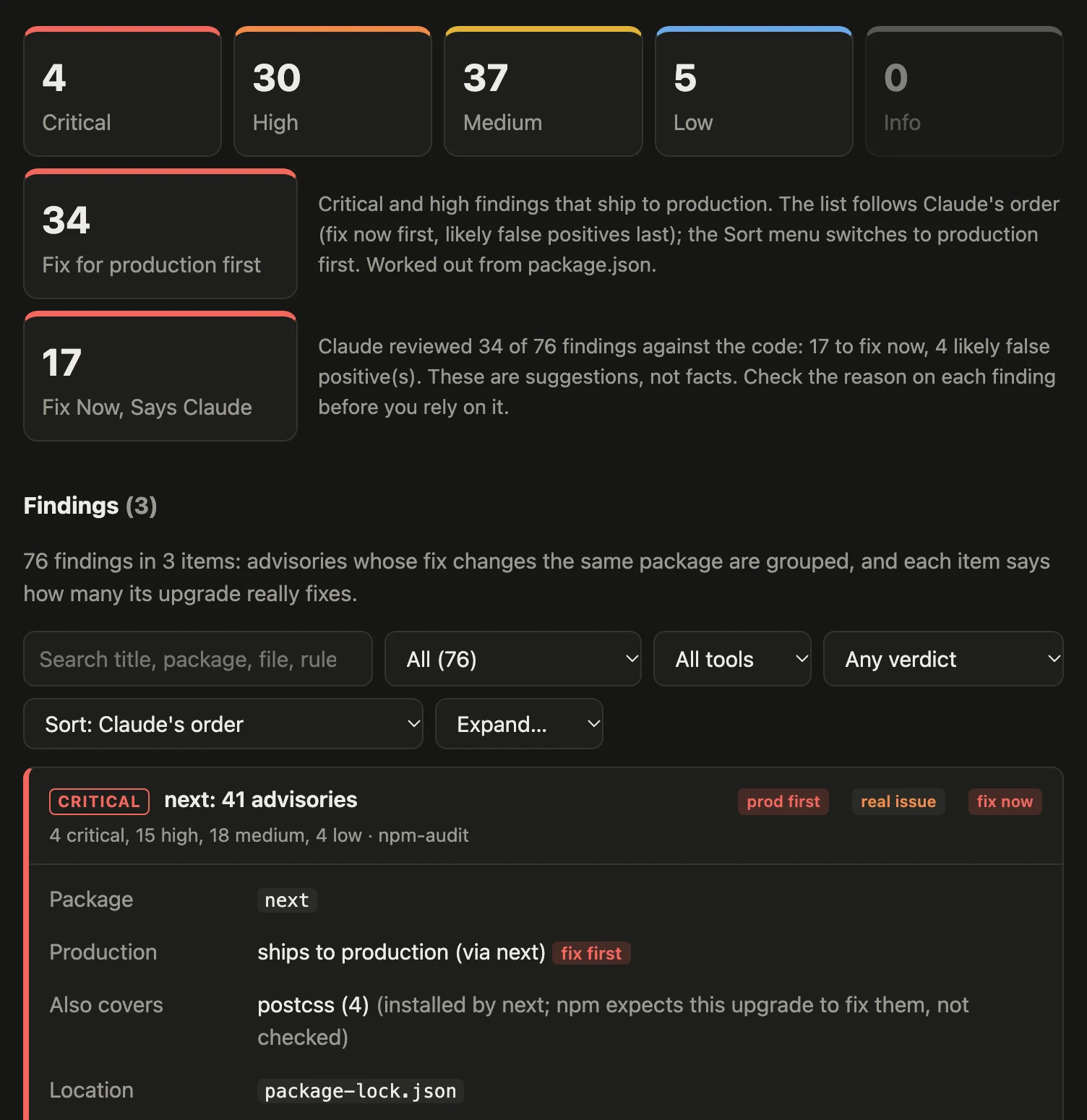
The HTML report is one self-contained file: severity tiles, filters, search, dark mode, prints cleanly. Keep it as a build artifact.
16
HTML report
A report you can explore
Severity tiles at the top; click one to show only those findings
Filters and search: production only, scanner, Claude’s verdict or any text
Grouped by upgrade: the fix, how many it really fixes, Claude’s take per package, every advisory
One file that works offline, has dark mode and prints cleanly
Written to .gnawky/security-report.html on every scan. Open it from View report.
17
Safety model
Careful with your code, by design
Read-only scans
Nothing changes until you confirm a plan.
No install scripts
Fixes use --ignore-scripts; never --force.
Secrets redacted
Never written to reports; no code snippets.
No shell
Tools run with argument arrays, so names can’t inject commands.
Offline mode
Your source code is never uploaded by the scan.
Shared decisions
Commit .gnawky-ignore.json; reasons travel with it.
18
$ npm install -g gnawky
$ cd my-app && gnawky
Version 0.4.1 on npm · gnawky.dev. In Claude Code, just say “gnawky find security issues”